

Have you ever wondered how the hell did Alan Braxe & Fred Falke do to make such a wonderful bassline on their legendary house track Intro?
They simply made the Queen of Funky bassline…
Maybe you would be interested to know how to setup such a bass sound with VST instruments and effects? Well, that’s what I’ll try to explain you.
Step 1: Choose the right bass sound
I’d recommand an old-school fingered bass sound, to give this warm sound Fred Falke have…
Trilogy by Spectrasonic is amazing and features a large choice of Fingered/Picked basses that can definitely be a good basis for your sound.
Step 2: Choose the right EQ effect
OK. Now you got your nice fingered/picked bass… But how to give it this such warm and special sound?
Since 2002, I use the same effect to EQ my basslines and make them warmer. This is the Renaissance Bass module by Waves.
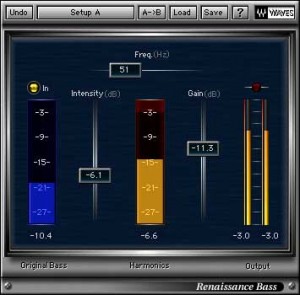
Use the preset Nose Job and have a listen… You’ll see what it’s all about. 😉
(I advise you to adapt the Freq. (Hz) setting to fit your master mix.)
Step 3: Compose the right bassline

If you have a listen to Alan Braxe & Fred Falke’s track Running, you’ll hear that, as a lot of Funky tracks do, the note used are very short and follow or complete the rythm. Depending on your composing level, try to use eighteenth or sixteenth notes.
Don’t hesitate to give me your feedback about this short tutorial. I plan to write a lesson every 2 weeks or so if you guys like it!

Interesting subject!!!
Thanks Mr Wize!!! 😉
i use also for along time Renaissance Bass kicking plugins
Yes Renaissance plugin is really a must have! Same for Waves Doubler for the stereo…
I second Resaissance plugin as a must have. The possibilities are really pretty sweet.
Amazing man!!! much appreciated this work for all us, and one asked if is possible, a midi loop example of that eighteenth or sixteenth notes, always thanx WIZE man!!!
I’ll see what I can do. Thx for the support bro! 🙂